TikTok Shop Free Shipping Voucher Guide Philippines (2026)
- Claim shipping vouchers from the banner in the Shop tab, and claim early because batches run out.
- Free shipping is shared between the platform and the seller, which is why some items never get the badge.
- Usually one shipping voucher per checkout, and it often stacks with seller, platform and payment promos.
- Shipping vouchers generally work with COD, but GCash cashback and similar promos don't.
- A missing voucher usually means the batch ran out, the cart is under the minimum, the item isn't covered, or your account was flagged.
- Real vouchers are claimed inside the app. Links promising "exclusive vouchers" are phishing.
A ₱99 phone case on TikTok Shop stops being a ₱99 phone case the moment delivery gets added. Shipping fees kill a lot of small purchases, which is why the free shipping vouchers matter more than they look.

They show up often. The trick is knowing where to claim them, when they tend to drop, and why they sometimes refuse to apply. This guide covers all of that, plus how they work with COD, what to do when GCash fails at checkout, and how to avoid the scams that target people hunting for vouchers. TikTok Shop changes its promos and rules regularly, so check the app before you count on any of it.
Who pays for "free" shipping
Somebody always does. In most cases the cost is shared between the platform and the seller. That's why some listings never get a free shipping badge: for sellers of heavy, bulky or very cheap items, the math doesn't work, so they opt out. It's a business decision, not a glitch on your end.
It also helps to know who's shipping. Items fulfilled by TikTok ship from the platform's own warehouses and tend to have more consistent shipping discounts. Items shipped by the seller go through regular couriers, and the shop owner sets the delivery rules. Some offer free delivery above a certain amount, others rely only on platform vouchers.
Minimum spend and stacking
Most shipping vouchers need a minimum item subtotal, although campaign days sometimes bring vouchers with no minimum at all. If your cart is just under the line, a cheap add-on can push it over. Just make sure the add-on is something you'd use.
In general, you can use one shipping voucher per checkout, and two shipping vouchers won't combine. A shipping voucher can often be used alongside a seller voucher, a platform discount voucher and a payment promo. The app usually picks a combination for you, but tap the voucher row and check it yourself. A sensible order is shipping first, then seller, then platform, then payment, because the shipping voucher only touches the delivery fee and leaves the subtotal alone for your other discounts. For the Shopee side of this, see our guide to stacking Shopee vouchers.
How to claim them
TikTok Shop mostly uses claimable vouchers inside the app instead of codes you type. Open the TikTok app and go to the Shop tab. Near the top you'll see a vouchers or coupons banner, which is usually front and center during sales. Tap Claim on the ones you want. They sit in your account until you use them or they expire. Shop as usual, and at checkout, tap the voucher row to see or change what's applied. Before you place the order, make sure the shipping fee actually shows as free or discounted.
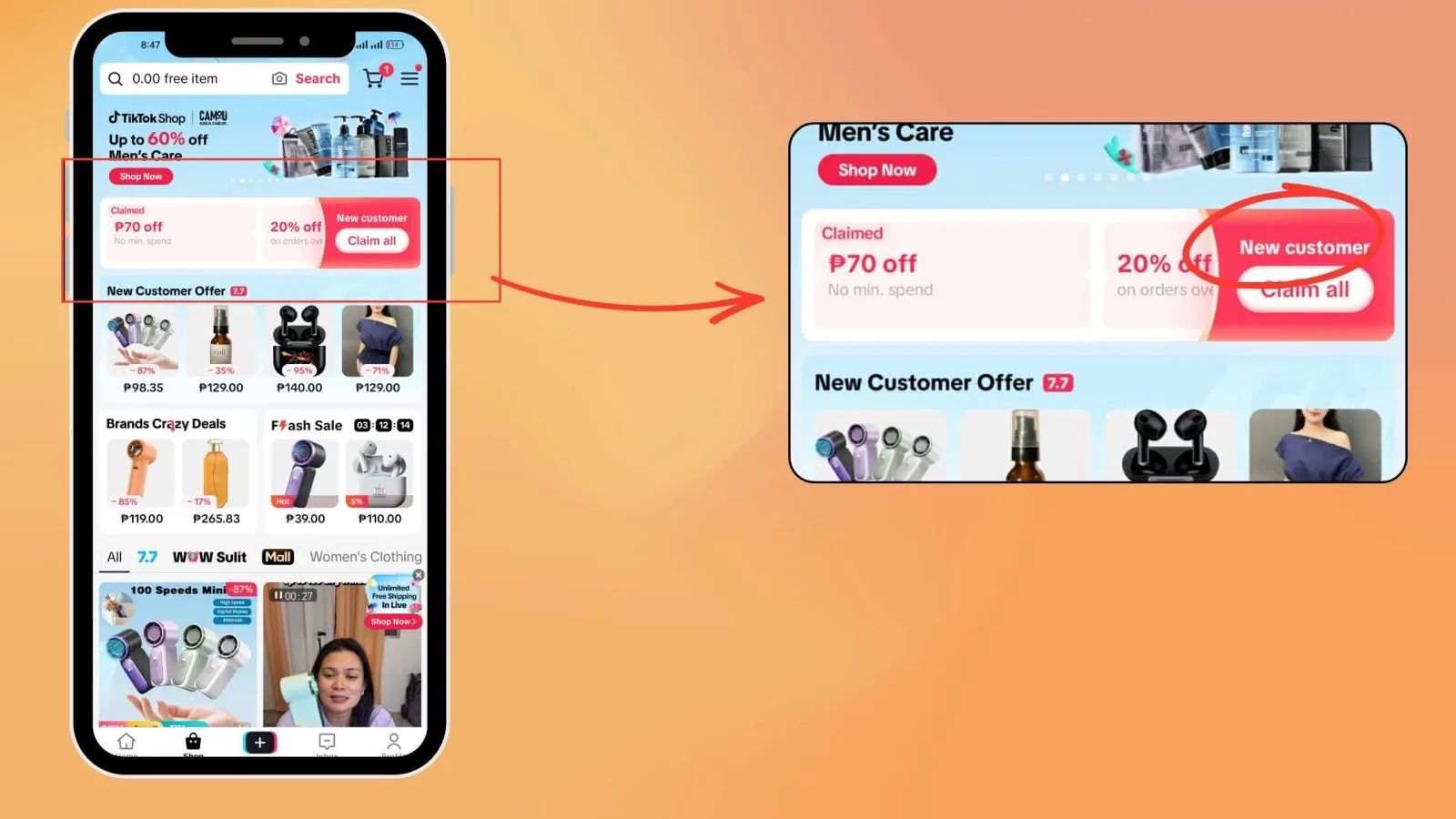
Timing matters because batches are limited. Claim in the morning even if you won't check out until night. Payday sales and the big double days (6.6, 9.9, 11.11, 12.12) are when bigger shipping subsidies and low-minimum vouchers show up most. Our sale calendar shows how the year usually goes.
Livestreams and creator links
Sellers and creators sometimes drop vouchers during a LIVE that beat the public ones, and some only work while the stream is running. If the host announces a shipping drop, claim first and decide later. Products tagged in videos through the yellow basket can also carry their own discounts, so tap the basket and check the product page before assuming there's nothing.
Your bank or e-wallet can add one more layer. During big sales, e-wallets and card issuers sometimes run cashback or discounts for TikTok Shop purchases. Those change every campaign, so check the payment step at checkout and your bank's promo page. Our guide to credit card promos explains how they usually work.
Do shipping vouchers work with COD?
Generally, yes. The voucher takes money off the delivery line, not the payment method, so it can apply whether you pay by e-wallet, card or cash on delivery. What won't work on COD is a promo tied to a specific way of paying, like a GCash cashback offer.
For COD, prepare the exact total after vouchers, because that's what the rider will collect. Very large carts may also need to be paid online, since COD usually has a maximum order value.
When the voucher won't show or won't apply
It's almost always one of five things: the batch ran out, your cart is under the minimum, the item or seller isn't covered, your address is outside the voucher's area, or your account has been flagged by TikTok's risk checks.
That last one surprises people. The platform watches for voucher abuse, and certain patterns can trigger restrictions: several accounts on one phone to collect new-user vouchers, repeated cancel-and-reorder cycles, or sudden location jumps from using a VPN. If you think that's what happened, stick to one account, stop cancelling and reordering, and turn the VPN off. If it keeps happening, contact TikTok Shop support through the app.
If a free shipping badge disappears from an item overnight, the seller may have left the program, or that day's batch may simply be used up. Wait for the next batch or find the same item from another shop that still has the badge.
Fixing GCash errors at checkout
GCash failures on TikTok Shop are common enough to deserve a checklist. Work through it in order:
- Make sure your balance covers the full total after vouchers.
- Update both TikTok and GCash. Old app versions cause a lot of payment failures.
- Turn off any VPN or ad blocker, since they can break the hand-off between the two apps.
- Finish the OTP step quickly. If it times out, cancel and start the payment over instead of retrying halfway.
- Clear TikTok's cache in the app settings, then try again.
- Try once and wait. Tapping Pay over and over can trigger a temporary security hold.
- If the same error keeps coming back, wait a day before unlinking and relinking GCash.
Still stuck? Contact GCash support for wallet problems or TikTok Shop support for order problems, and pay by card or COD in the meantime.
Cancellations and returns
For the full return and refund process on TikTok Shop, Shopee and Lazada, see our returns and refunds guide.
If an order is cancelled before it ships, any shipping fee you paid is normally refunded with it, and unused vouchers may come back to your voucher wallet if they're still valid. Check right after the cancellation, and use a returned voucher quickly if it's about to expire. Return shipping for change-of-mind returns depends on the seller and the current policy, so read the return terms on the order page.
Scams aimed at voucher hunters
People looking for vouchers are easy targets, which is why the safest rule is to keep everything inside the app. Claim vouchers only in the official app, pay only through in-app checkout, and never send GCash directly to a seller.
Three schemes come up again and again. The first is the COD parcel scam, where a rider arrives with a package you never ordered and asks for payment. If you can't match it to your order history, refuse it. Our guide to fake COD parcels walks through what to do. The second is the "exclusive voucher" link sent by message or posted in comments. Those are phishing pages built to steal your TikTok or GCash login, because real vouchers are claimed inside the app. The third is fake support: someone posing as TikTok or a courier who asks you to "verify" your account. Real support won't ask for your password or OTP in chat.
If it happens to you, move quickly, since the first day or two matter most. Call the CICC at 1326. For seller disputes the platform can't resolve, you can escalate to the DTI at 1-384 or through its online Consumer Care system. Our scams guide covers what to document.
For sellers you don't know, look for the DTI E-Commerce Philippine Trustmark. It's a badge the Department of Trade and Industry issues under the Internet Transactions Act (RA 11967) to online businesses that register and agree to its consumer protection standards. Its QR code should open the DTI's own verification page. If it opens anywhere else, treat the badge as fake. The program is still rolling out, so a missing badge doesn't automatically mean a seller is shady, but a verified one is a good sign for bigger purchases.
Before you check out
- Vouchers claimed earlier in the day, inside the official app
- Cart above the minimum spend
- Voucher row checked at checkout
- Payment inside the app, no direct transfers
- COD parcels matched to your order history before paying
- 1326 saved in your contacts
A shipping voucher might save you ₱50 or ₱100 on an order. Staying inside the app can save you a lot more than that.


Comments 0
Wala pang komento. Be the first to comment!
Leave a Comment